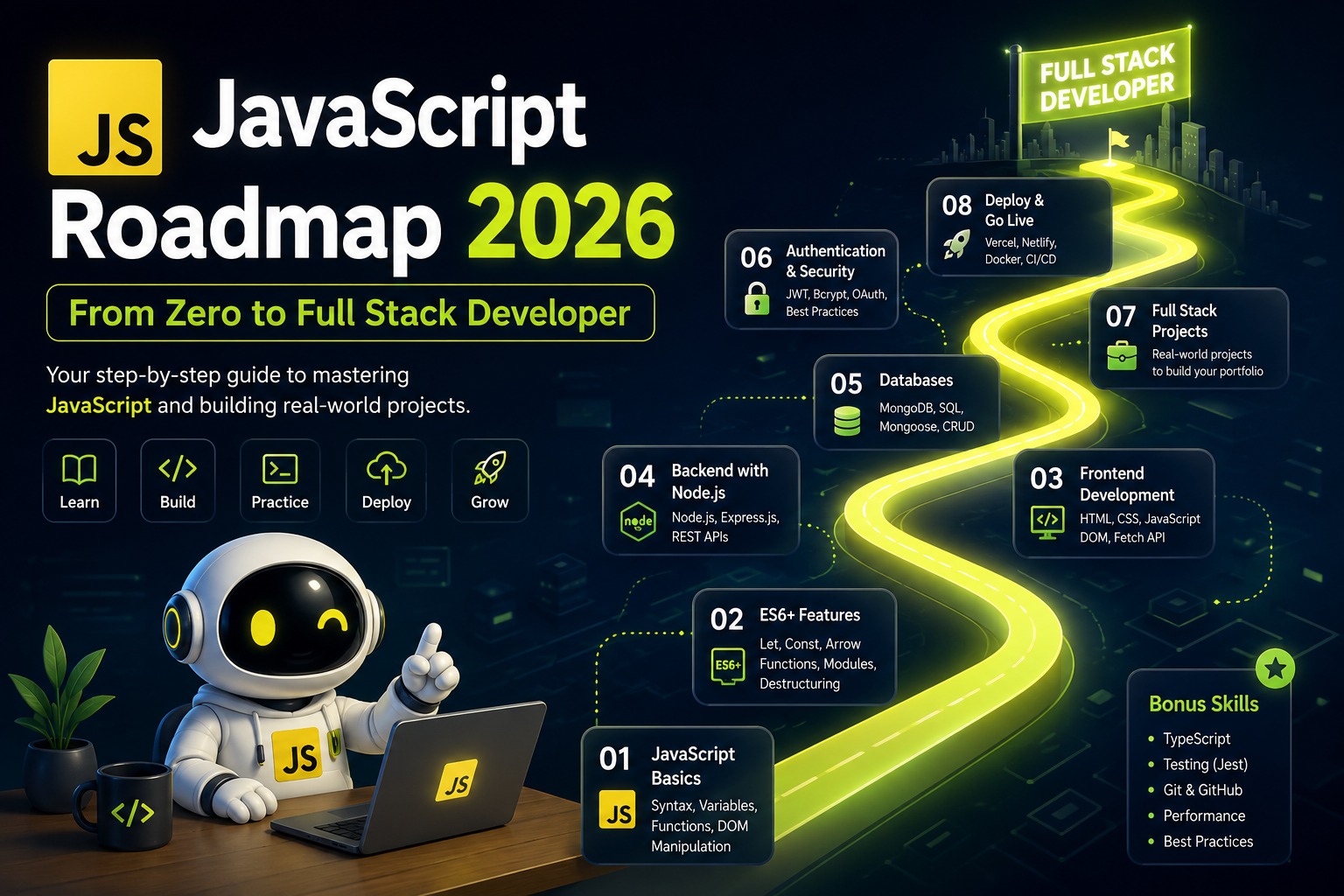
JavaScript Roadmap 2026: From Zero to Full Stack Developer Step-by-Step
Master JavaScript from scratch with this practical 2026 roadmap. Covers vanilla JS, React, Node.js, projects, and the exact sequence to become a job-ready full stack developer.
RV
Ravi Vohra
18 Jul 2026
32 min read
JavaScript Roadmap 2026: From Zero to Full Stack Developer (Practical Step-by-Step)
JavaScript is the most practical language to learn in 2026. One language across the entire stack. Frontend, backend, even mobile if you go that route later. The job demand is massive. The ecosystem is mature. The learning resources are abundant.
But the ecosystem is also overwhelming. React, Next.js, Node, Express, TypeScript, Zustand, Prisma, tRPC. The list of tools and frameworks is endless. Beginners do not know where to start. Many start in the wrong place, get confused, and quit
This roadmap gives you the exact sequence. What to learn. In what order. For how long. What to build at each stage. No fluff. No "learn these 47 libraries." Just the straight path from zero to employable full stack developer.
Month 1: HTML, CSS, and the Internet
You cannot skip this. Every full stack developer needs HTML and CSS fundamentals. Not mastery. Enough to build a decent-looking page without panicking.
HTML basics. Document structure, tags, attributes. Forms and inputs. Semantic elements like header, nav, main, section, article. Accessible markup with labels and alt text.
CSS fundamentals. Selectors, properties, values. The box model. Margin, padding, border. Flexbox for layout. Grid for more complex layouts. Responsive design with media queries. Mobile-first approach. Basic animations with transitions.
How the internet works. HTTP requests and responses. What happens when you type a URL and press enter. DNS, browsers, servers. Status codes like 200, 404, 500. This knowledge is assumed in every backend conversation.
Build something. A personal portfolio page. A landing page for a fictional product. A responsive blog layout. The projects should look decent on mobile and desktop. They do not need JavaScript yet. Just clean, responsive HTML and CSS.
Month 2: JavaScript Fundamentals
This is the most important month. Weak fundamentals here cause problems for the rest of your career. Strong fundamentals make React and Node feel like natural extensions.
Variables and data types. let, const. Why var is avoided. Strings, numbers, booleans, arrays, objects. Type coercion and why it causes bugs.
Functions. Declaration, expression, arrow functions. Parameters and arguments. Return values. Scope. Global, function, block scope. Closures. A function that remembers variables from its outer scope.
Control flow. if-else, switch, ternary operator. Loops. for, while, forEach, for-of. When to use each.
DOM manipulation. Selecting elements with querySelector. Modifying content, attributes, styles. Creating and removing elements. Event listeners. Click, submit, input, scroll. Event delegation.
Asynchronous JavaScript. Callbacks. Promises. then, catch, finally. Async and await. Fetch API for HTTP requests. Error handling with try-catch.
Array methods. map, filter, reduce, find, some, every. These are used constantly in React. Master them.
Object and array destructuring. Spread and rest operators. Template literals. Modules. import and export.
Build something. A task manager with add, delete, and mark complete. A weather app that fetches data from a free API. A quiz app with score tracking. A simple e-commerce cart with quantity updates. Build at least three small projects. The code should be yours, not copied from a tutorial.
Month 3: Git, GitHub, and TypeScript Basics
Git is not optional. Every developer uses version control. Learn the basics.
Git commands. init, clone, add, commit, push, pull, status, log. Branching and merging. Creating branches for features. Merging them back. Pull requests on GitHub. Resolving simple merge conflicts. A .gitignore file.
TypeScript is increasingly expected in professional environments. Learn just enough to be productive.
Basic types. string, number, boolean, array, object. Interfaces for object shapes. Union types for values that could be multiple types. Optional properties. Function type annotations. Type inference. Let TypeScript infer types where possible. Explicit types where inference is unclear.
Build something. Take one of your JavaScript projects from Month 2 and rewrite it in TypeScript. The compiler will catch bugs you did not know existed. This exercise teaches you why TypeScript exists.
Month 4: React Fundamentals
React is the most popular frontend library. The job listings demand it. The ecosystem is built around it. This month focuses on core React concepts.
Components and JSX. Functional components only. Class components are legacy. JSX syntax. Embedding JavaScript expressions. Props. Passing data from parent to child. Prop destructuring.
State. useState hook. Updating state. State batching. The difference between state and regular variables.
Effects. useEffect hook. Side effects like fetching data or updating the document title. Dependency arrays. What they control and what happens when you omit them. Cleanup functions.
Event handling in React. Synthetic events. Passing handlers as props.
Lists and keys. Rendering arrays of components. Why keys matter. Using unique IDs, not array indices.
Conditional rendering. Ternary operator. Logical AND. Early returns.
Forms. Controlled components. Managing form state. Handling submission.
Lifting state up. Sharing state between siblings by moving it to a common parent.
Component composition. Children prop. Building reusable components.
Build something. A note-taking app with categories. A habit tracker with streaks. A movie search app using a public API. A simple blog with a JSON placeholder API. Build at least two projects. Get comfortable with the React mental model before adding routing and state management.
Month 5: React Ecosystem and Advanced Patterns
React alone is not enough. Real applications need routing, state management, and performance optimization.
React Router. BrowserRouter, Routes, Route. Dynamic routes with parameters. useNavigate for programmatic navigation. Link component for declarative navigation. Nested routes.
State management. Start with Context API plus useReducer. For complex global state, Zustand is simpler than Redux. Learn one. Understand the concepts. The specific library matters less than understanding when global state is needed.
Performance optimization. React.memo to prevent unnecessary re-renders. useMemo for expensive calculations. useCallback for stable function references. Do not optimize prematurely. Profile with React DevTools first.
Custom hooks. Extracting reusable logic into custom hooks. useFetch, useLocalStorage, useDebounce. Custom hooks are the primary pattern for code reuse in modern React.
Forms at scale. React Hook Form for complex forms with validation. Zod for schema validation.
Build something larger. An e-commerce frontend with product listing, filters, cart, and checkout. A social media dashboard with multiple pages and data visualization. A project management board with drag and drop. Deploy it on Vercel or Netlify.
Month 6: Backend with Node.js and Express
Full stack means backend too. Node.js lets you run JavaScript on the server. Express is the most common framework.
Node.js fundamentals. The runtime. Modules. File system operations. Environment variables.
Express.js. Setting up a server. Routing. GET, POST, PUT, DELETE. Route parameters and query strings. Middleware. What it is. Built-in middleware like express.json. Custom middleware for logging or authentication. Error handling middleware.
Database. MongoDB with Mongoose for document databases. Easy to start with. PostgreSQL with Prisma for relational databases. More powerful for complex queries. Learn one well. Understand the other conceptually.
Authentication and authorization. JWT tokens. Bcrypt for password hashing. Protected routes. Role-based access control.
File uploads. Multer middleware. Storing files locally or on cloud storage.
Build something. A REST API for a task management app. A blog API with users, posts, and comments. An e-commerce API with products, orders, and authentication. Test endpoints with Postman or Thunder Client. Document the API with a README.
Month 7: Full Stack Integration and Deployment
This is where everything connects. Frontend talks to backend. Backend talks to database. The whole thing deploys to the cloud.
Connecting React to Express. API calls from React using fetch or axios. CORS configuration. Environment variables for API URLs.
Full stack projects. A complete task management app. React frontend, Express backend, MongoDB database, authentication, deployed. A complete blog platform. Users sign up, create posts, comment. Admin dashboard. A complete e-commerce prototype. Products, cart, orders, payment integration simulation.
Deployment. Frontend on Vercel or Netlify. Backend on Render, Railway, or a VPS. Database on MongoDB Atlas or Supabase for PostgreSQL. Environment variables configured on each platform. A real URL that anyone can visit.
Build all three projects. They become your portfolio. In interviews, you talk about these projects instead of your education. Deployed projects with real URLs are worth more than any certificate.
Month 8: Next.js and the Modern Stack
Next.js is built on React and adds server-side rendering, routing, and API routes. It is becoming the standard for new React projects.
Next.js fundamentals. Pages and App Router. Server components versus client components. Data fetching with fetch in server components. API routes for backend logic. Static generation and server-side rendering.
Full stack with Next.js. You can build an entire application within Next.js. Frontend and backend in one codebase. Database connections using Prisma within API routes or server components. Authentication with NextAuth.js.
Build something. Rebuild one of your full stack projects in Next.js. You will appreciate how much boilerplate Next.js eliminates. Deploy on Vercel with one click.
What to Skip
There are things beginners waste time on that are not necessary for the first job. Redux. Context API plus useReducer or Zustand handles most state management. Redux is still used in large legacy codebases but is not a priority for learning. GraphQL. REST APIs handle most use cases. Learn GraphQL later if you need it. Docker and Kubernetes. Important for DevOps roles. Not a priority for a junior full stack developer.
Testing frameworks. Jest and React Testing Library are valuable but not required for your first job. Learn enough to be aware of them. Svelte, Solid, Vue. React has the most jobs. Focus on one framework. Diversify later.
The Portfolio You Need
By the end of this roadmap, your GitHub should have the following deployed projects with clean READMEs. A full stack task management app with authentication. A blog platform with user roles. An e-commerce prototype with cart and payments. A Next.js project built from scratch.
These four projects demonstrate frontend, backend, database, authentication, state management, and deployment. They are evidence you can build things. Employers hire based on evidence.
The Closing Thing
This roadmap is intense. It requires consistent effort over eight months. The people who finish are not the smartest. They are the ones who show up every day and build things.
The JavaScript ecosystem will continue evolving. New tools will emerge. The fundamentals, JavaScript itself, React patterns, backend concepts, database design, will remain relevant. Invest in fundamentals. Build projects. Deploy them. The job will follow.
If you want structured guidance through this roadmap, SkillsYard's Full Stack Web Developer program covers this exact path with live mentorship, real projects, and placement support. A free demo class is available if you want to see the teaching style before committing.
Related Courses
Programming Courses
BEGINNER
Advance Certification in C++
Master C++ with OOP, STL, memory management & design patterns through real-world projects and expert guidance.
Learn C, the language behind operating systems and embedded devices from variables and loops to pointers, memory management, and data structures with hands on projects and expert guidance.
Accelerate your career with Advanced Python Certification master enterprise coding, data science, web dev & automation with hands on projects and expert mentorship.